
Quick answer
Nintendo lists Star Fox Switch 2 GameShare support for both online and local access. The same listing gives the practical multiplayer baseline: 1-2 players on one system, 1-8 players online, Nintendo Switch Online requirements for online features, and GameChat requirements for remote sessions. Star Fox GameShare matters because Star Fox is short-session, replayable, and multiplayer-friendly.
Some players search for the feature as Star Fox game share or Starfox GameShare, but the practical question is the same: what can a guest actually play? The feature does not automatically prove that every campaign mission, Battle Mode rule, score system, or online playlist is shareable.
Confirmed sharing facts
The strongest guide should start with official facts, not assumptions. Nintendo's current baseline supports local sessions, online sessions, GameChat, and player-count limits. It does not yet answer every post-launch question about Battle Mode access or guest progress.
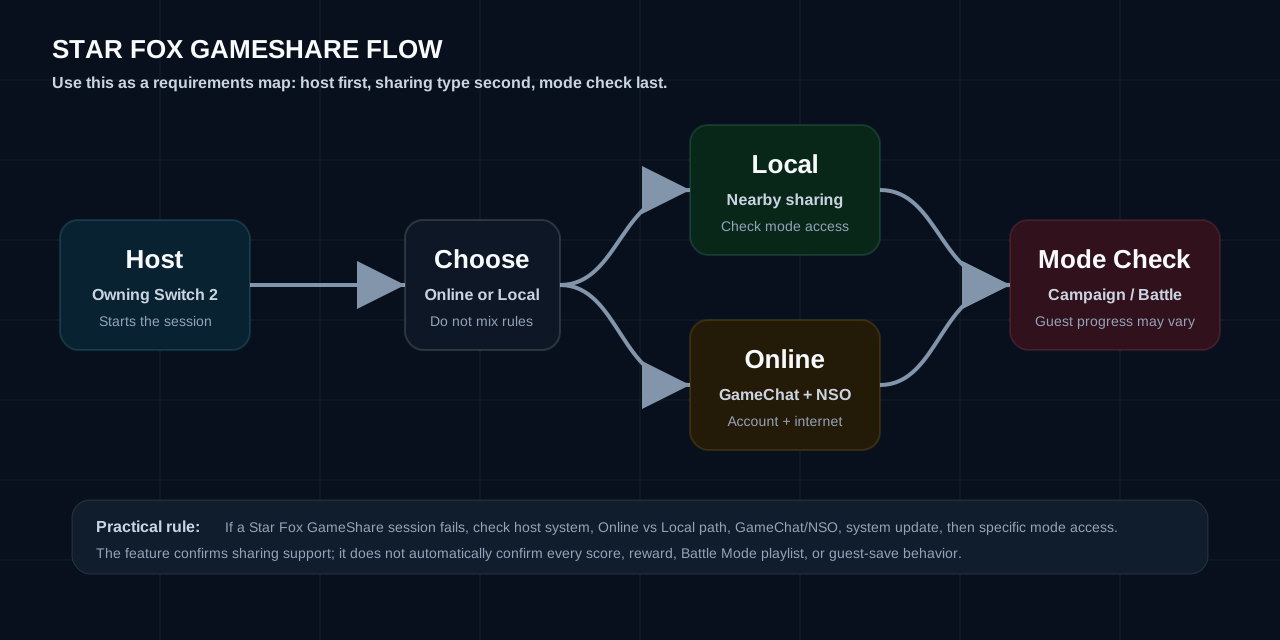
Star Fox GameShare setup flow
The safest Star Fox GameShare setup is to separate the host requirement, sharing type, player count, and control test. That keeps GameShare troubleshooting grounded in official constraints instead of guessing from one failed session.
Step 1
Start from the owning Switch 2
Nintendo says a Nintendo Switch 2 system is required to initiate the session, so the host system is the first requirement to check.
Step 2
Choose Online or Local sharing
Star Fox supports both Online and Local access contexts, but remote sessions add GameChat and online-service requirements.
Step 3
Confirm player count
Use 1-2 local players and 1-8 online players as the baseline before checking whether a specific mode supports shared access.
Step 4
Test controls before Battle Mode
Star Fox game share sessions should verify aiming, boost, brake, rolls, and Joy-Con 2 mouse comfort before fast multiplayer.
AOE: Does Star Fox support GameShare?
Answer: Yes. Nintendo lists Star Fox GameShare for Online and Local access.
Opinion: Treat the feature as confirmed support, not a guarantee that every mode behaves like full ownership. A precise guide should explain what is listed now and what needs launch verification.
Evidence: Nintendo's listing names Online and Local access, local player support, online player support, and online requirements.
AOE: how local sessions may work
Answer: Star Fox is listed for local access, but final mode access should be checked after launch.
Opinion: Local sessions are most valuable for quick trials, control testing, and short multiplayer sessions. Star Fox is not a slow campaign-only game; short missions, repeated runs, and quick dogfight practice make local access more useful.
Evidence: Nintendo lists local access support, 1-2 local players, and a Switch 2 requirement to initiate the session.
AOE: online sessions and GameChat
Answer: Nintendo's listing notes that online sessions require GameChat, and online features require Nintendo Switch Online, a Nintendo Account, and internet access.
Opinion: For Star Fox, GameChat is not just social decoration. Fast Arwing combat, target switching, and Battle Mode callouts make voice coordination potentially useful. This should be written as a multiplayer feature with communication constraints, not as a generic sharing badge.
Evidence: The official listing gives 1-8 online play, remote access, GameChat requirements, and online subscription requirements.
AOE: shared access vs local multiplayer vs online multiplayer
Answer: Star Fox GameShare, local multiplayer, and online multiplayer overlap, but they are not the same feature.
Opinion: Users should not assume local sharing equals permanent access, full online ownership, or every Battle Mode playlist. Local multiplayer describes players on one system. Online multiplayer describes internet sessions. GameShare describes access. Battle Mode may overlap with those systems, but final rules need direct verification.
Star Fox GameShare troubleshooting
If Star Fox GameShare is not working, start with requirements before assuming the mode is unsupported. Most problems should be sorted by session type: online, local, account requirements, system updates, and mode access.
Best Star Fox GameShare use cases
Star Fox GameShare is most useful for low-friction sessions: letting another player test controls, introducing someone to the campaign rhythm, trying short missions, comparing Joy-Con 2 mouse controls, and preparing for Battle Mode. Local access has a clearer practical use case than a long-form RPG because Star Fox sessions can be short, repeatable, and skill-focused.
The professional way to evaluate a shared session is to ask whether it preserves the core skill loop: aiming, braking, boosting, rolling, target reading, and fast retries. If a nearby player can quickly feel that loop, the feature has real value even if some deeper modes are limited. If Battle Mode trials are supported, it becomes a discovery feature for multiplayer rather than only a convenience feature.
What to verify after launch
- Which Star Fox modes are shareable.
- Whether Battle Mode works through a shared session.
- Whether campaign co-op or mission trials are available to the guest.
- Whether guest progress, scores, or settings save after a shared session.
- How stable an online session feels in fast Arwing combat.
- Whether all control options are available to the receiving player.
- Whether future updates, DLC, or patches change access.
AOE: Why Star Fox is a strong GameShare fit
Answer: Star Fox GameShare fits the game because Star Fox is built around short missions, repeatable routes, readable vehicle control, and quick multiplayer sessions.
Opinion: The feature is more compelling than shared access for a slow, inventory-heavy game. A new player can understand the value of an Arwing run quickly: aim, dodge, boost, brake, survive, retry. It can therefore work as a playable trial, a local teaching tool, and a way to test control preferences before committing to online play.
Evidence: Nintendo lists online and local access, 1-2 local players, and 1-8 online players. Those facts make Star Fox GameShare worth covering as a feature page, while the exact mode list remains a launch verification item.
Practical setup notes
Before using Star Fox GameShare, players should confirm which console starts the session, whether the receiving player needs a Nintendo Account, and whether online access needs Nintendo Switch Online on one account or both accounts. For local sessions, the most important setup question is input comfort: a player who struggles with aiming or camera distance will judge the game differently from someone who first tests controls in a calmer mission or training-like scenario.
Star Fox GameShare also intersects with storage and updates. The official listing gives a 14.8 GB file size, but session behavior may still depend on installed updates, region, account status, and whether the shared mode uses online services. Local sessions should be tested separately from remote sessions because local and remote play may have different latency, communication, and access limits.
Where to go next
Related guides